
ONBOARDING
INFORMATION
WELCOME TO THE SHOP!
If you're here, it will have meant that you have read and understand all the rules and polices for being a part of meowbunnybear and agree to the terms of services.
You may review them again at any time here.
STEP 1: SET UP YOUR VENDOR ACCOUNT
We use Ricochet for managing vendor inventory and sales.
You will be receiving an email from Ricochet with your username and instructions to set a password.
Once your password is set, you can log into your vendor account at meowbunnybear.ricoconsign.com.
If you receive a "token invalid" prompt, hit "forgot password" to reset it.
In addition, Ricochet offers an app available for both Android and iOS devices.
You can find a tutorial for the app here:
If you haven’t received the email, please contact us at meowbunnybear@gmail.com or via discord.
STEP 2: CREATE INVENTORY
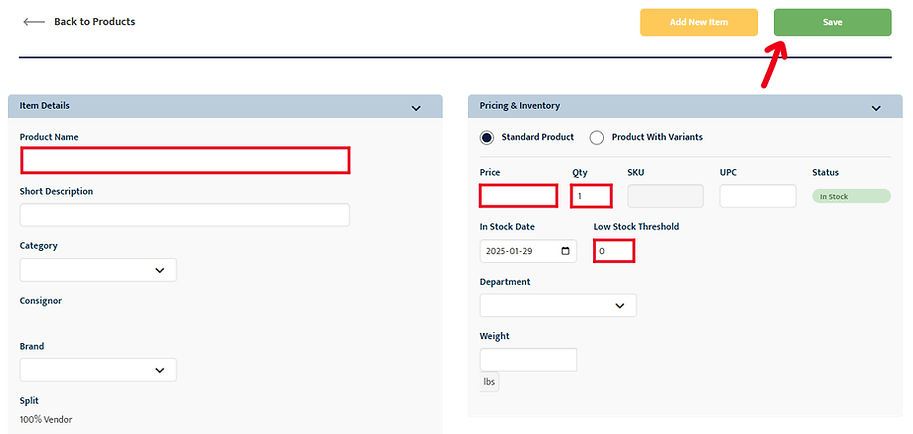
To manage your inventory, in the header go to the “Inventory” tab and click on “Add New” to enter details for your product. These are the only fields that are required to be filled out:
-
Product Name
-
Price
-
Quantity

The "In Stock Date" must be before the item arrives at the store and available for sale. Otherwise, there is no need to toggle this field.
The number input in the “Low Stock Threshold” field will trigger a product’s status as “Low Stock” when its quantity falls below or meets the set threshold.
--
If you do not want to manually upload all items:
check this guide to import a csv (2. Consigned Inventory) for your items: IMPORTING GUIDE
SKU numbers will be automatically generated upon saving.
--
IMPORTANT: As of current, Ricochet does not alert you when an item's status changes. It is your responsibility to keep check of your stock. We have contacted Ricochet to suggest implementing an alert system since that would save a lot of time and effort. We can only hope they will make these changes.
After filling out all mandatory fields, click the “Save” button.
Your product will then appear on the “Inventory” overview page. Repeat this process for each product.
To delete a product, select the checkbox on the product, click the “More” dropdown menu, and select “Archive Selected”. You can view archived products by clicking “View Archived,” and reactive products by selecting “View Active.” Note that only admins have the ability to permanently delete products.
!! IMPORTANT !!
We do not charge tax on the items in order to let vendors keep 100% of their sales. We only act as an intermediary agent and as a pass through transaction. It is up to your discretion on how to price your items, but the price shown will include tax.
The "Charge Tax" button is for our service fees. This is not changeable.

Labelling Products
Ricochet offers automatically generated labels for your products, which you can access by selecting the checkboxes for the items you wish to label, and clicking the “Print Labels” button.
If you don’t have a compatible label printer with the automatically generated labels by Ricochet, you may also create your own labels. Self-made labels must be in uppercase and include the following information:
-
SKU
-
Price
-
Product Name and Barcodes are optional but would help speed up checkout times!
NOTE: You MUST use a font with a slashed zero to distinguish the number ‘0’ from the letter ‘O’, and clearly differentiate the letter ‘I’ from the number ‘1’ like the samples below.
Examples of labelling methods:

Sales, Discounts & Promotions
To ensure staff can apply discounts correctly, every item involved in a sale, bulk discount, or promotion must be clearly labeled with the relevant information. This label should include details about the deal, such as the specific promotion or pricing adjustment.
Example: If you’re running a “BUY 2 GET 1 FREE” promotion, each item participating in the deal should have a label to indicate this for both the customer and staff to be informed of the offer.
Samples of self made labels with a "BUY 2 GET 1 FREE" promotion:


Shop wide sales and promotions will be scheduled for events and holidays throughout the year.
All vendors will be informed prior and will have the opportunity to sign up via a form to participate in these sales. Each vendor will be able to choose between various discount offers that will be reflected across all their products.
IMPORTANT:
-
All items at the shop including overstock items, must be labelled
-
Labels must be printed — handwritten labels will not be accepted
-
Make sure your labels are clear and readable
-
Products without proper labels will not be sold
DON'T WANT TO LABEL THINGS YOURSELF?
HERE ARE SOME SUGGESTIONS:
-
Have the back side of your prints include the sku/barcode.
-
Ask if your manufacturer(s) provide a cheaper service to label your items for you.
-
Have a helper or volunteer assist you.
We know the initial labelling of items requires a lot of time and effort, and that keeping up with it is too. If you are unable to use any of the suggestions above, we are providing a labelling service for those who need it.
It is still your responsibility to keep track of your stock and inventory!
We will be working on doing our best to help our vendors keep track of their stock as well.
Updates will be given regarding all shop news via our Discord and email.
STEP 3: YOUR DISPLAY
NOTE:
-
All wall and entry shelves are 5 levels, with the top layer being removable by request (not all requests are able to be accommodated for).
-
Displays can have a max height of 3 feet from the top shelf. Any taller will be a safety concern. Wall shelves are an exception if anchored securely.
LOCAL VENDORS
Please come in during the time confirmed for your load-in date.
-
Notify staff of who you are so that they can direct you to your shelf.
-
You will be handed an overstock bin labelled with your vendor name, this is for any extra stock you'd like us to keep on hand to restock for you (free of charge).
-
Be sure that your display fits within your space and does not interfere with your neighbor vendors.
-
Feel free to record videos and pictures to use for promotional content.
-
Please be mindful of your surroundings as during store hours, there may be customers.
NON-LOCAL VENDORS
Please ship all your merchandise and display materials, including overstock, to the address below by your confirmed load-in date.
-
Please fill out the shipping form when you send your package(s). You may send items you order online for your display directly to us. Please include your vendor name in the receiver line so we know it's your package.
-
Make sure that all your items are packed securely so that it does not get damaged during shipping.
-
We won't be responsible for any break and loss that happens during the shipping.
-
Please check that all required parts and materials are included for the set up process such as screws and their counterparts, mounts, specialty tape etc.
-
All the must should be labeled and packed ready for selling (pre-bagged, sleeved etc.).
-
Any stock that is not labelled by accident can be labelled by us, however a large amount may incur a fee. See labelling services.
-
Future restocks may be sent to us at any time as long as we are informed via the shipping form.
SET UP INSTRUCTIONS
-
In reply to your acceptance email, provide us a photos with detailed setting up instructions for your shelf.
-
Once completed, we will send you photos and videos of your display for your review and use in promotional materials.
SAMPLE SHELF INSTRUCTIONS


TIPS FOR YOUR DISPLAY & ITEMS
-
Test your display before setting it up at the shop.
-
Include signage and pricing that are clear and easy to read. Branding is important to stand out!
-
Make sure the display is not too bare or overcrowded.
-
Be sure to display all products and have space for extra stock on the shelves.
-
Provide business cards or a info sheet/QR code to help customers know who's products they are purchasing from.
-
Example items for your display:
-
acrylic organizers for nail polish - holding stickers
-
wooden dish racks - holding prints
-
jewelry holders and pegboards - keychains
SHELF SPACE RECAP

Discovery Shelf - $150 + tax
-
Effective September 2025
-
Location: Back wall of the shop
-
Cube size: 13.25”H x 13.25”W x 15.38”D - Each vendor will receive 4 cube spaces vertically.
-
1 month term only. No renewals.
-
If you want to upgrade to a mainstay shelf, you must contact staff during your 1 month period. You will then be added to a waitlist for an available space.
-
Initial set up service fee: $30
Artists may set up themselves in store at no cost. -
No overstock bins are provided for this shelf type.


STEP 4: OVERSTOCK & RESTOCKING
Overstock Inventory
Each vendor will be provided overstock bin space with sizes in accordance to their shelf. Please make sure that your items all must fit within this space as there is limited space fairly distributed between all vendors. Staff will restock your shelf with items from these bins at no cost.


SMALL BINS
Half shelves will be provided with 1 bin.
LARGE BINS
Non local vendors and full shelves will be provided with a large bin or 2 small bins. Any extra bins will be prioritized for non local vendors.
Local Vendors:
Vendors may come into the shop to restock during shop open times.
Please let a staff member know when you come into the shop so they know who you are! Alternatively you can let us know on our Discord or via email beforehand.
Once you arrive and please be mindful of your surroundings!
Non Local Vendors:
Please fill out our shipping form when you’re sending us packages.
STEP 5: PROMOTE YOURSELF!
Once your display setup is complete, take photos and/or videos to showcase your shelf and products!
Spread the word across your social media platforms and don't forget to tag us @meowbunnybear so we can share your posts on our channels and help boost your visibility.
Don't forget to fill out the "ABOUT YOU" onboarding document section to help us promote your shelf as well. We add every vendor who provides us their information on our vendors page, so send us your information to be added!
For out-of-town vendors, we’ll help to take photos and videos to share with you as well as do our best to promote each and every vendors space!
LOYALTY PROGRAM
All shelves (excludes discovery) are required to stay with us for a minimum of 3 months.
Afterwards, rent will be on a month by month basis and you may leave at any time as long as you give us 30 days notice.
However, after staying with us for the initial 3 months, if you would like to extend your stay for another 3 months, we offer a loyalty program where your rent will have a discount of 20% off your monthly rent.
Vendors must apply to be enrolled in this program as it is a sign-up for another three-month commitment period.